
1. What is VoxCPM2 AI?
We live in an era where AI articles and AI videos look so realistic that they easily trick the human eye. However, AI voice generation has historically felt robotic, hollow, and unnatural. If you have ever used a standard text-to-speech application to narrate your videos or articles, you know exactly how painful this experience is. The audio sounds choppy, rigid, and instantly gives away that a machine produced it.
Why has this been such a massive bottleneck in content creation? Traditional artificial intelligence voice tools rely heavily on an old framework called a discrete tokenizer. To put it simply, these tools take smooth, continuous human speech and forcefully chop it into tiny, isolated digital fragments. Think of it like taking a beautifully blended oil painting and turning it into a low-resolution pixelated mosaic. Because the audio undergoes harsh fragmentation and data compression during the rendering loop, all the warm, emotional human details are permanently erased. What you are left with is a robotic metallic buzz and a voice that reads text like a boring textbook.
This is where VoxCPM2 AI steps in to completely break the rules. VoxCPM2 is an open-source, 2-billion-parameter (2B) foundational audio model that bypasses old processing shortcuts. Its true technical breakthrough lies in its industry-first, tokenizer-free continuous diffusion architecture.
Instead of slicing audio files into pixels, VoxCPM2 treats human speech as a fluid, uninterrupted wave. It models the entire natural flow of sound from beginning to end. By doing this, it removes the mechanical middleman, allowing the system to output clean, warm, and highly authentic human voices in a single computational pass.
Technical Specifications
Model Core Scale: 2-Billion Hyper-Parameters.
Core Architecture: Tokenizer-free Continuous Semantic Diffusion paired with an AudioVAE V2 Decoder.
Audio Output Fidelity: Native 48kHz studio-grade ultra-high-definition output (whereas most market tools cap outputs at 24kHz or lower).
Native Multilingual Support: Inbuilt mastery of over 30 global languages (including English, Mandarin, Spanish, Japanese, French, German, and Arabic) for seamless, cross-border localized vocal transitions.
Operational Execution Speed: Real-Time Factor (RTF) of 0.13. This means that as soon as you hit generate, the engine synthesizes your audio file almost instantly.
Hardware and System Deployment Requirements: Highly optimized for independent, local creators. It runs efficiently on consumer-grade hardware with a single 8GB VRAM dedicated graphics card (such as an NVIDIA RTX 3060, RTX 4060, or newer equivalents).
Because the audio is synthesized as a continuous waveform, VoxCPM2 eliminates structural issues like swallowing letters, skipping words, or stuttering mid-sentence. Even better, it inherently captures human conversational nuances—such as natural breath sounds, subtle giggles, light laughter, and complex shifts in emotional tone.
🛠️ If you want to experience this live, click through to the official:
VoxCPM2 free TTS for Voice Design
2. Main Features of VoxCPM2 AI
Whether you are an independent video creator, a cross-border e-commerce brand manager, or a professional podcast producer, the capabilities built into the VoxCPM2 AI engine provide everything required to scale your audio pipelines.
Zero Metallic Distortion: By eliminating audio tokenization, the model produces voices that sound completely smooth, velvety, and indistinguishable from live studio recordings.
Cross-Lingual Voice Cloning in 10 Seconds: Provide the system with a short, 10-second vocal snippet in one language (e.g., English), and the model can immediately output speech in Mandarin, Japanese, or Spanish while retaining the exact vocal identity, timbre, and accent quirks of the original speaker.
Pure Text-Based Voice Design: Completely skip the expensive process of hiring voice actors. Simply write out a natural language description detailing the exact characteristics of the voice you want, and the AI will build an entirely original, non-existent voice blueprint for you from scratch.
Granular Emotional Controls: The model doesn't just copy the pitch of a voice; it replicates real human feelings. You can command the system to deliver lines with anger, excitement, sadness, or soft whispers to fit the dramatic context of your script.
Zero-Latency Streaming Audio: With ultra-low RTF metrics, the model effortlessly feeds live audio streams, making it perfect for real-time customer service automation, interactive gaming NPCs, and AI live-streaming avatars.
3. Step-by-Step Workflows: How to Use VoxCPM2 AI
Getting top-tier results from the VoxCPM2 AI free dashboard is straightforward. The entire system is built around three distinct production workflows. Let's break down each method step-by-step.
Workflow 1: Traditional Text-to-Speech (TTS)
This is the foundational feature designed to turn your written scripts into clean, professional voiceovers that sound like high-end voice talent.
What You Need to Prepare:
A Clean Script: Write your text using natural human pacing. Use standard commas, periods, and exclamation marks. Do not use complex, artificial coding modifiers. The continuous diffusion engine reads standard punctuation to determine where to add human breath intervals and natural pauses.
A Web Browser: Use any updated browser on your desktop or smartphone to connect to the cloud dashboard.
Standard Production Process:
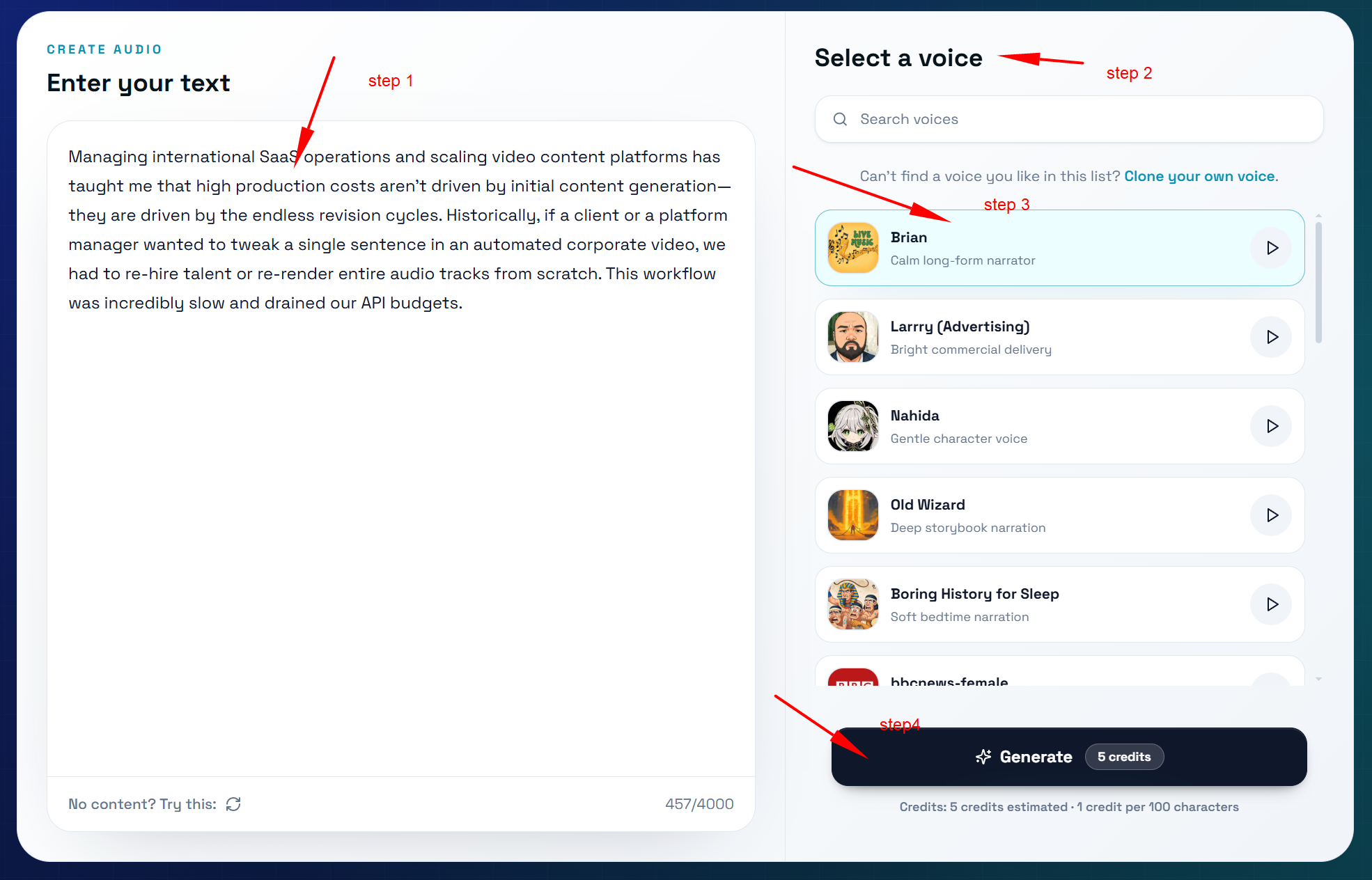
Paste Your Content: Copy your written script and paste it directly into the primary text input field on the dashboard.
Choose an Audio Silhouette: Browse the voice catalog, click the play icon to sample pre-configured voices, and select one that fits your brand's style.
Specify Target Language: Inform the AI which language you are inputting so the system applies the correct pronunciation parameters.
Execute Generation: Click the "Generate Audio" button to run the continuous diffusion pipeline.
Audit and Export: Listen to the generated sample. Once satisfied, export the audio as a studio-grade 48kHz uncompressed WAV or high-bitrate MP3 asset.
Crucial Tips for Success
Segment Your Inputs: Avoid pasting massive blocks of text containing tens of thousands of words all at once. Break your scripts into logical, smaller paragraphs. This keeps processing times ultra-fast and prevents semantic drift.
Format Complex Abbreviations: For specialized acronyms like "SEO" or "SaaS," spell them out phonetically (e.g., "S-E-O") if you want to ensure the model pronounces each individual letter clearly.
Workflow 2: Text-Driven Voice Design
This workflow is built for SaaS marketers, product managers, and developers who do not want to use generic, overused stock voices. Instead of uploading real human files, you type out a text prompt to design a brand-new voice actor from scratch.
What You Need to Prepare
A Desired Voice Profile: Think about the age, gender, mood, emotional warmth, and pacing of the voice you want to build.
Prompt Templates: If you are unsure how to describe a voice, read through community-tested voxcpm2 voice design control instructions examples to see how experienced creators combine specific physical descriptors to adjust vocal weight and texture.
Standard Production Process
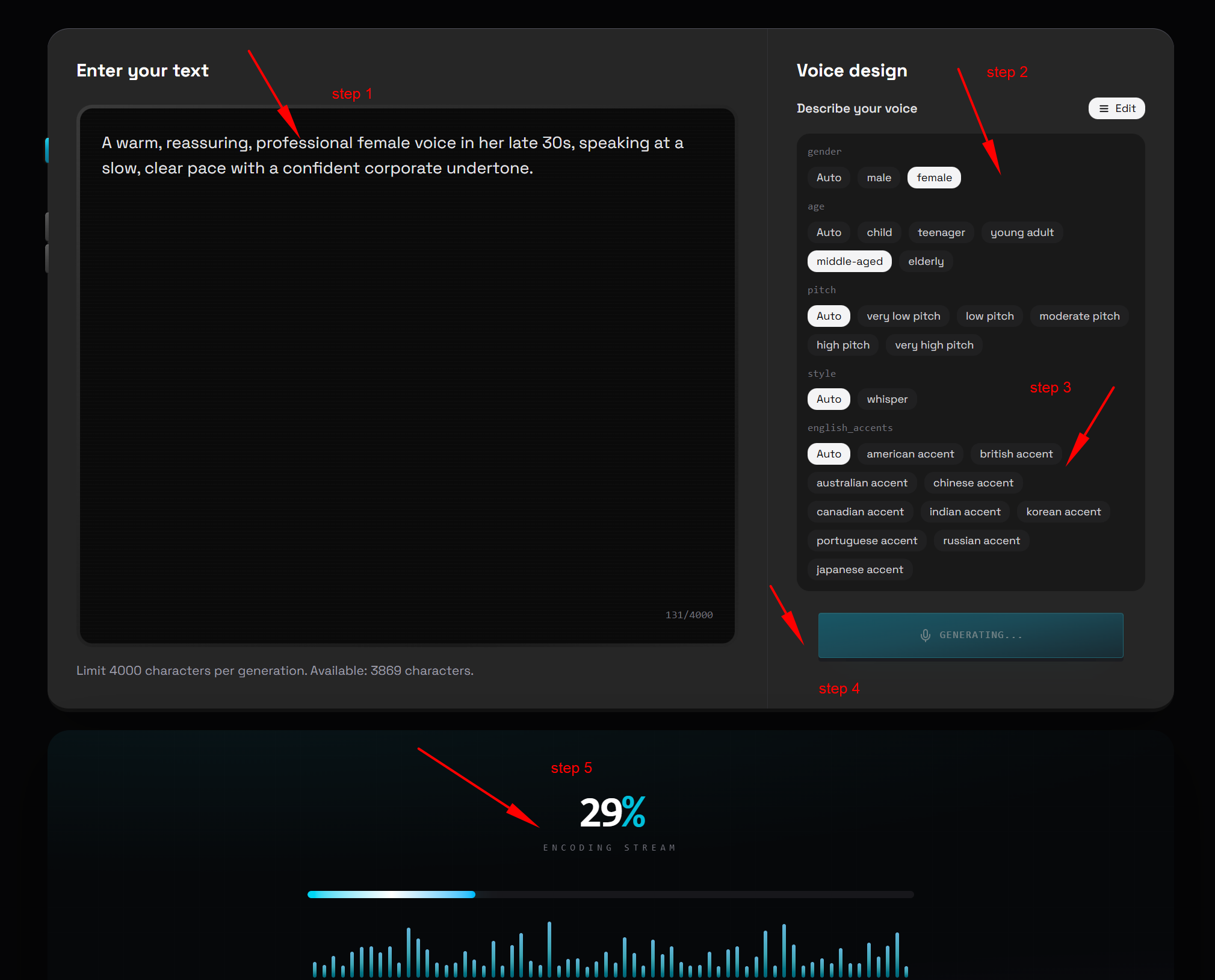
Open the Design Studio: Navigate to the "Voice Design" tab on your control board.
Input Descriptors: Write a detailed description of your target vocal identity in the prompt box (e.g., "A warm, reassuring, professional female voice in her late 30s, speaking at a slow, clear pace with a confident corporate undertone.").
Run Stochastic Sampling: Click the render button. The model will analyze your prompt and present 3 to 4 distinct audio variants.
Select the Best Profile: Review each generated variant to find the one that best matches your project's visual branding.
Save to Voice Vault: Assign a unique name to your creation (e.g., "Tech Product Explainer Voice") and save it to your personal voice library for future production use.
Crucial Tips for Success
Use Concrete Physical Adjectives: Avoid generic phrases like "a beautiful voice" or "a great narrator." Instead, use precise physical terms like "raspy," "husky," "booming," "breathy," "high-pitched," or "deep baritone."
Avoid Logical Contradictions: Do not feed the model conflicting descriptive logic like "a high-pitched, booming deep bass male voice." Contradictory prompts confuse the diffusion network, resulting in distorted audio artifacts.
Workflow 3: High-Fidelity Voice Cloning
This advanced workflow allows you to extract the exact vocal traits of a real person from a tiny sample and direct them to read entirely new content with full emotional conviction.
What You Need to Prepare
A Clean Reference Audio Sample: A short, high-fidelity audio file lasting between 5 to 15 seconds (WAV format recommended). This sample must be completely pristine: zero background music, no wind interference, no echoes, and absolutely no secondary voices speaking in the background.
Your New Target Text: The script you want your cloned voice actor to read.
Vocal Emotion Directives: Map out the exact emotional arc of the text. This relies on advanced voxcpm2 dynamic emotional voice cloning methodologies, which bind vocal identity tokens directly to specific emotional modifiers.
Standard Production Process
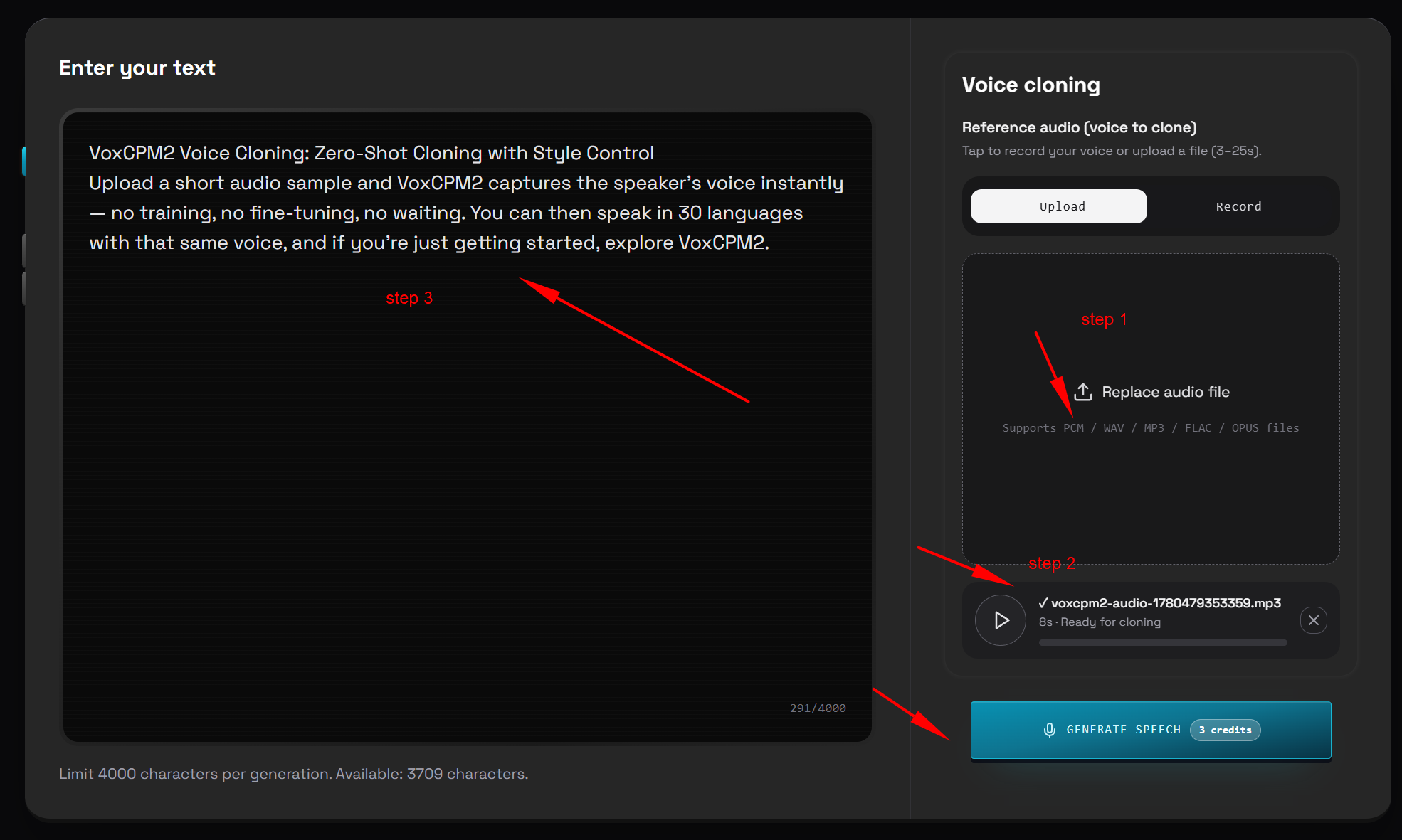
Upload the Sample: Drag and drop your 10-second audio snippet into the cloning interface.
Run Voiceprint Extraction: Allow the system to analyze the audio for a few seconds to map the speaker’s vocal cords, cadence, and unique accent patterns.
Input New Script and Directives: Paste your new script into the prompt box, and use bracketed tags to specify the emotional delivery (e.g., "[Mood: Speaking in a soft, confidential whisper]").
Execute Synthesis: Click the cloning button. The autoregressive network blends the extracted voiceprint tokens with your emotional modifiers.
Download Mastering Output: Once rendering finishes, export your high-fidelity cloned audio file.
Crucial Tips for Success
Garbage In, Garbage Out: The cloning engine mimics inputs with terrifying accuracy. If your reference file contains static hiss or room echo, the model will treat those noises as a natural part of the speaker's vocal traits and bake them into all future outputs. Always prioritize clean, isolated source recordings.
Ethical and Legal Guardrails: Never clone the voice of a real person for commercial distribution without obtaining clear, documented consent. Protect your brand from copyright claims and legal liability.
4. Direct Technical Comparison: VoxCPM2 AI vs. Competitors
To understand how VoxCPM2 positions itself within the current AI ecosystem, we ran an exhaustive feature comparison matrix evaluating it against three leading audio generation frameworks.
Deep Feature Comparison Matrix (2026 AI Audio Landscape)
Core Evaluation Metric | VoxCPM2 AI | ElevenLabs Pro | ChatTTS v2 | OpenVoice v3 |
Tokenizer-Free Waveform Diffusion | ✅ | ❌ | ❌ | ❌ |
Native 48kHz Studio Quality | ✅ | ❌ | ❌ | ❌ |
Pure Text Descriptive Voice Design | ✅ | ❌ | ❌ | ❌ |
Zero-Shot Cross-Border Voice Cloning | ✅ | ✅ | ❌ | ✅ |
Micro-Nuance Emotional Control | ✅ | ✅ | ✅ | ❌ |
Open-Source Local Deployment | ✅ | ❌ | ✅ | ✅ |
Real-Time Factor (Execution Speed) | 0.13 (Instant) | 0.62 (Slow Queue) | 0.22 (Moderate) | 0.35 (Moderate) |
Minimum Local VRAM Requirements | 8GB VRAM | Cloud Only | 12GB VRAM | 6GB VRAM |
Native Global Languages Supported | 30+ Languages | 29 Languages | 2 Languages | 4 Languages |
Zero-Configuration Free Access Area | ✅ | ❌ | ✅ | ❌ |
When we ran a high-pressure test comparing voxcpm2 vs elevenlabs voice cloning similarity, the target audience and positioning for both tools became crystal clear.
ElevenLabs: It is a closed-source, cloud-only tool. While the cloned voices sound highly convincing, every single API call burns through expensive credits. On top of that, users often face slow server queues, and the audio quality usually caps out between 24kHz and 44.1kHz.
VoxCPM2: Thanks to its tokenizer-free design, it outputs full-bodied 48kHz lossless audio right out of the box. It does an amazing job with natural human micro-expressions—like light breathing, realistic pauses, and subtle emotional shifts. It sounds just like a real person. You don't have to waste time tweaking pause lengths for every single comma or period in the backend; a simple text prompt gets the job done perfectly.
5. High-Value Commercial Monetization Frameworks
Deploying studio-grade voice synthesis changes how independent businesses and content teams scale their operations. Here is how digital entrepreneurs are leveraging VoxCPM2 to drive real business revenue:
Framework 1: Automated Cross-Border E-Commerce Asset Scaling
International digital marketing teams no longer need to spend thousands of dollars on freelance marketplaces hiring native actors for localized ad variants. By recording a single script in your native language, you can spin out 30 localized audio tracks for TikTok, Meta, and Google ads in minutes. The vocal identity remains identical across all language variants, building immediate brand trust worldwide.
Framework 2: Multi-Character Audiobook Production Pipelines
Independent authors can build deep, multi-character audiobooks directly from text. By utilizing the "Voice Design" framework, creators can use text prompts to generate unique voices for every character in a novel—from a young protagonist to an older villain. Combined with precise emotional tags, the final output provides a compelling audio experience at a fraction of the cost of traditional recording studios.
Framework 3: Real-Time Generative Video Game NPCs
Independent game development teams can connect the model's low-latency API endpoints directly into their runtime engines. Game characters can then speak dynamically to players, responding to unstructured text inputs with real-time voices that reflect anger, joy, or fear based on game events.
Framework 4: Tender Customer Support & AI Companion Systems
Saas founders can leverage the 0.13 RTF speed to deploy natural voice customer agents that respond within milliseconds. Because the model automatically integrates human-like breathing and natural pauses, customer calls feel warm, supportive, and conversational, completely avoiding the cold tone of traditional robotic voice menus.
6. Technical Advantages and Material Disadvantages
Technical Advantages 👍
Stunning Studio-Grade Clarity: The native 48kHz output delivers rich, full-bodied tones that flow naturally without the harsh digital distortion common in older systems.
Complete Creative Ownership: The text-based Voice Design tool lets you generate entirely unique voices, removing worries about actor licensing issues or surprise royalty fees.
Incredibly Cost-Efficient: The underlying model is open-source. For teams on a budget, the cloud-hosted web version provides clear access via the VoxCPM2 AI free sandbox tier.
Low Local Hardware Requirements: The underlying code is highly optimized, allowing a budget-friendly desktop setup with an 8GB RTX 3060 card to host production-ready workflows locally.
Material Disadvantages 👎
Strict Sensitivity to Source Quality: The cloning module has zero tolerance for poor audio inputs. If your 10-second reference sample has background static or room echo, the engine will replicate those imperfections perfectly across all new voice outputs.
Vulnerability to Technical Abbreviations: When dealing with continuous text streams packed with unpunctuated industry acronyms, the engine can occasionally read through words too quickly, requiring manual spacing tweaks or phonetic spelling.
7. Expert Insights: Operational Review by Founder Pan Lijie
From the Desk of Founder Pan Lijie
"Managing international SaaS operations and scaling video content platforms has taught me that high production costs aren't driven by initial content generation—they are driven by the endless revision cycles. Historically, if a client or a platform manager wanted to tweak a single sentence in an automated corporate video, we had to re-hire talent or re-render entire audio tracks from scratch. This workflow was incredibly slow and drained our API budgets.
Integrating a zero-tokenizer continuous audio framework completely changed our content production workflows. In my personal testing, the natural pacing delivered by this continuous diffusion approach was a massive step forward.
When running direct evaluations on voxcpm2 vs elevenlabs voice cloning similarity, VoxCPM2 excels at capturing the tiny, unspoken details of a performance—like a subtle catch in the throat, realistic breathing pauses, and sudden shifts in emphasis. Instead of spending hours adjusting timing variables between individual words, our marketing teams can now generate localized, high-definition ad variations simply by typing descriptive prompts. For lean teams focused on global scaling, this technology eliminates traditional production bottlenecks and reduces voice generation costs close to zero."
8. Frequently Asked Questions (FAQ)
Q1: Where can I access the official tools if I don't have a background in coding?
A:Creators can completely skip complex server setups by opening their browser and launching the official cloud-hosted interface directly at the VoxCPM official dashboard.
Q2: Do I need expensive studio gear to get good results with the voice cloning tool?
A:Not at all. A simple voice note recorded on a standard smartphone works great. The only critical requirement is ensuring the recording environment is completely quiet and free of background noise or echo.
Q3: Why does a "tokenizer-free" continuous system sound better than older text-to-speech tools?
A:Older tools chop words into rigid blocks of digital data, creating a harsh, mechanical sound. A tokenizer-free system draws the audio out as a smooth, continuous wave, which preserves all the subtle glides, blends, and natural frequencies of human speech.
Q4: Are there copyright risks if I use the pure text "Voice Design" feature to make promotional content for social media?
A:There is zero copyright risk. Because the voices generated through the Voice Design feature are entirely synthetic and calculated by the AI from text descriptions, they don't belong to any real person, giving you full commercial ownership.
Q5: Is this framework optimized for cross-border e-commerce brands?
A:Yes, it is highly optimized for international expansion. The system natively supports over 30 major world languages, allowing you to clone a voice sample once and have it speak multiple foreign languages fluently.
Q6: How do I tell the AI to voice a script with a specific emotion, like joy or sadness?
A:You can apply emotional styling easily by adding clear text tags directly into your script, such as typing "[Mood: Energetic and Excited]" right before your sentence.
Q7: What are the hardware requirements to run the open-source model locally?
A:You just need a Windows or Linux system equipped with an NVIDIA graphics card that has at least 8GB of VRAM, such as a standard RTX 3060 or 4060 gaming card.
Q8: Can I test the platform's features without spending any money upfront?
A:Yes, absolutely. The cloud dashboard includes a built-in VoxCPM2 free access tier for new accounts, letting you test out cloning and voice design workflows completely free of charge.
Q9: Where can I find prompt examples for creating custom voices?
A: Absolutely. You can easily find plenty of community-tested voxcpm2 voice design control instructions examples shared by tech bloggers across the web. Just search for them, copy the text modifiers, and paste them into the platform.
Q10: What should I do if the engine mispronounces an unusual word or a brand name?
A:If the model hits an unusual word or a brand abbreviation and reads it incorrectly, you can easily fix it by spelling the word out phonetically in the text box (for example, writing "SaaS" as "Sass" or "S-a-a-S") to guide the audio output.
9. Conclusion: The Arrival of True Voice Freedom
The introduction of VoxCPM2 has fundamentally disrupted the era of stiff, mechanical robot voiceovers. By utilizing advanced continuous wave diffusion, it brings studio-grade audio quality to everyday creators while putting the power of custom voice design and emotional cloning directly into the hands of the community.
In today's fast-paced digital market, creators who move past rigid text inputs and learn to design distinct vocal identities will have a massive advantage.
Master your own high-fidelity audio production: