
If you’ve been searching for a free, high-quality text-to-speech tool that clones real voices and generates brand-new speakers from a simple text description, learning how to use VoxCPM2 is the most valuable hour you’ll invest this week.
Released in April 2026 by OpenBMB, VoxCPM2 is a 2-billion-parameter open-source TTS model that outputs 48kHz studio-quality audio across 30 languages — all under the Apache 2.0 license. This step-by-step guide walks you through every feature: from your first audio generation to the advanced voice cloning workflows used by YouTubers, podcasters, game developers, and content-localization teams. Every example includes the exact prompt, so you can copy, paste, and reproduce the result yourself.
TL;DR
VoxCPM2 offers 3 generation modes: Voice Design, Controllable Cloning, and Ultimate Cloning
Supports 30 languages with automatic detection — no language tags needed
Voice Design creates a brand-new voice from a text prompt alone, no reference audio required
Controllable Cloning copies a speaker’s voice from a 5–10 second clip, with emotion and pace control
Ultimate Cloning delivers the highest fidelity by combining reference audio with a word-for-word transcript
Works entirely in the browser — no GPU, no install, 2 free credits to start
What Is VoxCPM2 and Why Does It Matter?
VoxCPM2 is a tokenizer-free, diffusion autoregressive text-to-speech model built on the MiniCPM-4 backbone. Unlike conventional TTS systems that convert text into discrete phoneme tokens before generating audio, VoxCPM2 maps text directly into a continuous speech representation. The result: smoother prosody, fewer pronunciation errors on mixed-language input, and audio quality that holds up even on long-form content like audiobooks and podcast scripts.
Why creators choose VoxCPM2 over paid alternatives
Feature | VoxCPM2 | ElevenLabs |
|---|---|---|
Free to start | ✅ 2 credits, no card needed | ❌ Limited free tier |
Voice Design from text prompt | ✅ Yes | ❌ No |
Output sample rate | 48kHz | 48kHz |
Supported languages | 30 | 32 |
Speaker similarity benchmark | 85.4% (Minimax-MLS) | 61.3% |
Open-source commercial license | ✅ Apache 2.0 | ❌ Paid-only |
Inline emotion & pace control | ✅ Full inline prompt | Basic |
Benchmark and spec figures reflect each vendor’s published numbers as of mid-2026; verify against the original source before quoting.
These advantages make VoxCPM2 a compelling free ElevenLabs alternative for creators, developers, and businesses that need professional voice output without a monthly subscription.
Getting Started: How to Access VoxCPM2
The fastest way to get started is through the browser-based playground — no installation, no GPU, and no local setup required.
👉 Try VoxCPM2 free in your browser — no sign-up required
Open the playground and you’ll see three sections: a Control Instruction field (for voice prompts or transcripts), a text input field, and a Generate button. You get 2 free credits on your first visit — enough to test all three voice modes and hear the output quality before deciding to upgrade on the pricing page.
The 3 Voice Modes in VoxCPM2 — Step-by-Step Workflows
VoxCPM2 offers three distinct generation modes. Understanding when and how to use each one is the key to getting professional results quickly.
Mode 1: Voice Design — Create a Voice from a Text Description
Voice Design is VoxCPM2’s most unique feature. Instead of uploading a reference audio clip, you describe the voice you want in plain English using parenthetical style cues. The model then synthesizes a completely original speaker that matches your description.
When to use Voice Design
You need a custom voice for a brand, game character, or animated series
You don’t have reference audio available
You want to rapidly prototype multiple different speaker personas
Full workflow: How to use Voice Design
Step 1 — Open the playground Navigate to voxcpm.app in any modern browser. No login is required for your first 2 credits.
Step 2 — Write your voice prompt in the Control Instruction field Type a parenthetical description of the voice you want. Be as specific as possible — the more detail you provide, the more consistent the output.
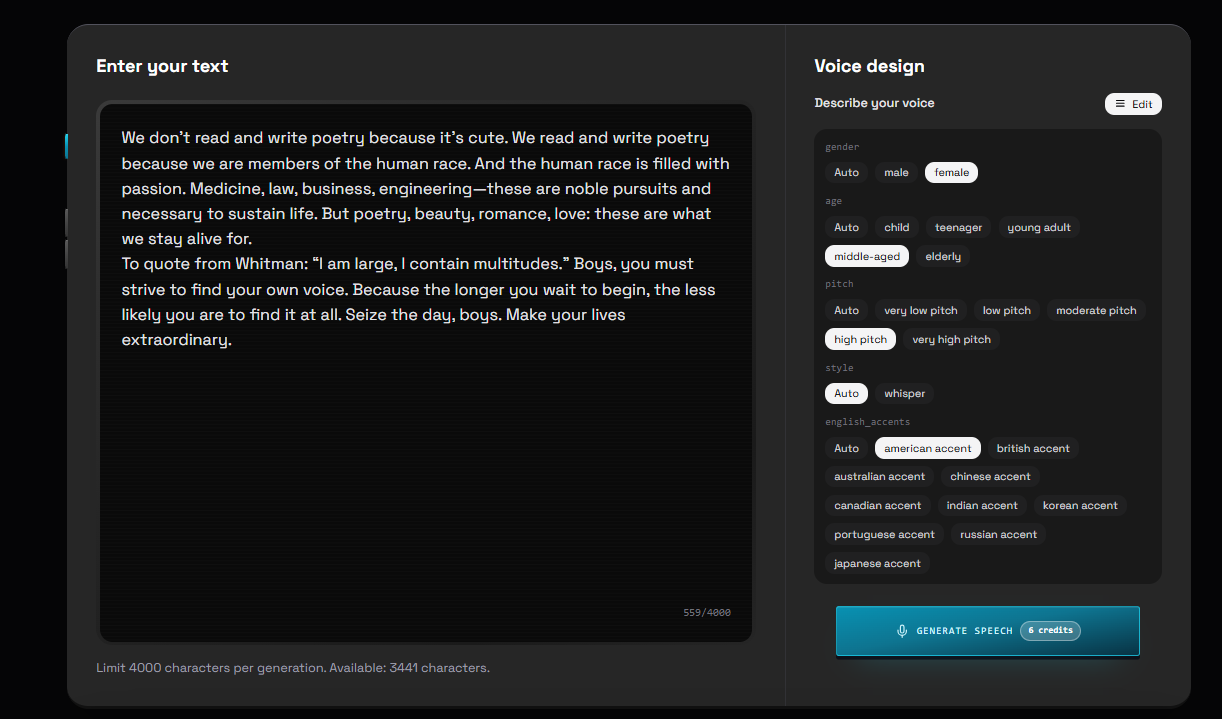
Example prompts:
(a young woman, warm and gentle tone, slight smile, measured pace)
(a deep-voiced male narrator, calm and authoritative, broadcast quality)
(an energetic teenage boy, fast-paced, enthusiastic, slightly breathless)
(a middle-aged man, slightly hoarse voice, measured pace, warm and trustworthy)
(a professional woman, confident and polished, slight American accent, boardroom energy)
Step 3 — Leave the reference audio field empty Voice Design does not require any uploaded audio. The prompt alone drives generation.
Step 4 — Paste your target script into the text field Enter the text you want VoxCPM2 to speak. Keep the first generation under 200 words so you can evaluate the voice before committing to a longer script.
Step 5 — Click Generate VoxCPM2 synthesizes a brand-new voice matching your description. The output is a downloadable WAV file at 48kHz.
Step 6 — Iterate if needed If the voice isn’t quite right, adjust the prompt — add emotion words (cheerful, melancholic, authoritative), change pace descriptors (slow and deliberate, quick and snappy), or regenerate 2–3 times with the same prompt and pick the best take.
Pro tip: Emotion words have the strongest effect on tone.
(warm, slightly melancholic, slow)produces noticeably different results from(warm, enthusiastic, upbeat)even with the same base description.
Mode 2: Controllable Cloning — Clone a Voice with Style Control
Controllable Cloning reproduces a real speaker’s voice from a short reference clip, with optional inline cues to steer emotion and pacing throughout the output. It’s the mode most users reach for when reproducing a consented speaker or maintaining a consistent custom voice across a large project.
What you need: a reference clip of 5–30 seconds. Clean audio with minimal background noise produces the best results. The model captures the speaker’s timbre, accent, and baseline delivery from this clip.
When to use Controllable Cloning
Audiobook narration where a consistent voice must persist across 10+ hours of content
Podcast production when a host is unavailable but existing episodes provide reference audio
Multilingual dubbing — clone an English-speaking host’s voice, then generate French or Spanish output
Full workflow: How to use Controllable Cloning
Step 1 — Prepare your reference audio Record or export a clean 10–30 second clip of the target speaker in WAV or MP3. A quiet room recording — even from a smartphone — outperforms a professionally recorded clip with heavy compression or background music.
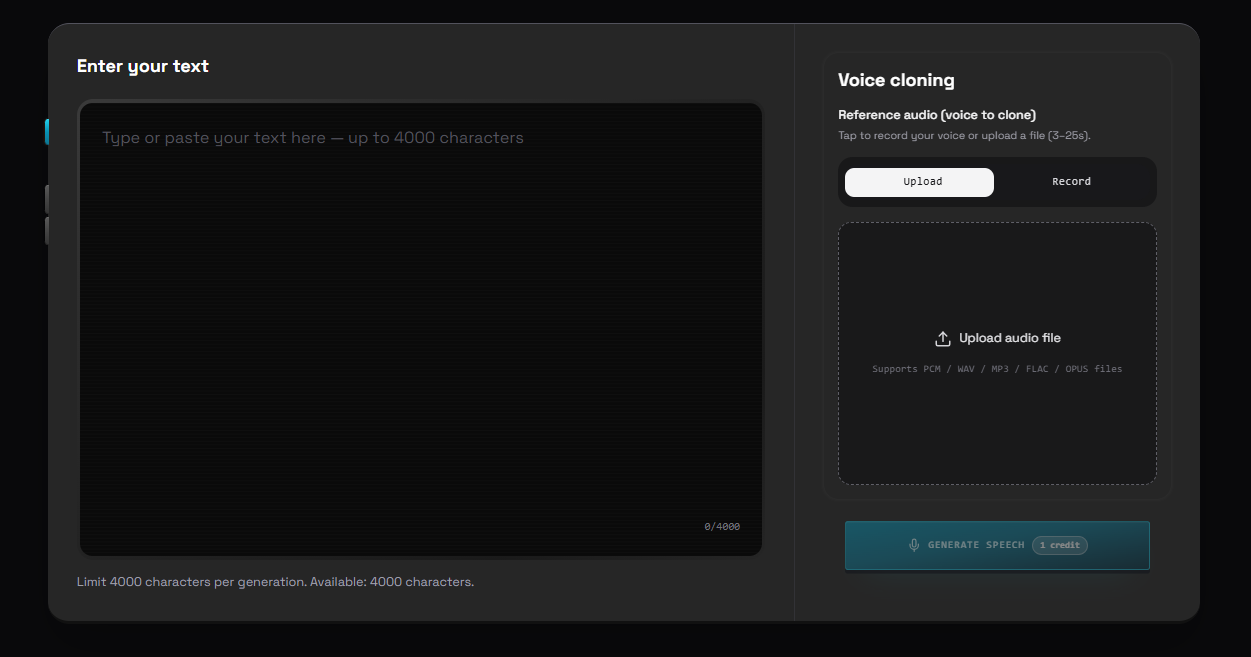
Step 2 — Upload the reference clip Click the audio upload button in the playground and select your file.
Step 3 — Add inline style cues to your script (optional) Change the voice’s emotion or pace mid-sentence using parenthetical inline cues embedded directly in the text:
Example script with inline cues:
Welcome back to the show. (warm, relaxed) Today we're covering something
I've been looking forward to for weeks. (excited, slightly faster) This
could genuinely change how you think about content creation.
Step 4 — Paste the full script into the text field Enter the complete narration or dialogue you want the cloned voice to deliver.
Step 5 — Click Generate VoxCPM2 clones the speaker’s vocal identity from the reference clip and applies it to your script, with the inline cues shaping delivery throughout.
Mode 3: Ultimate Cloning — Maximum Fidelity Voice Replication
Ultimate Cloning produces the highest-fidelity voice reproduction available in VoxCPM2. The key difference from Controllable Cloning is the addition of a transcript of the reference audio — this lets the model treat the reference clip as a preceding audio context rather than just a style guide. The result is a near-seamless continuation of the original speaker’s vocal identity.
When to use Ultimate Cloning
High-stakes production where the speaker’s exact vocal identity must be preserved (documentaries, narrative podcasts, author-voiced book summaries)
Any project where Controllable Cloning produces output that sounds “similar but not quite right”
Full workflow: How to use Ultimate Cloning
Step 1 — Prepare and upload your reference audio Same as Controllable Cloning — 10–50 seconds of clean audio. Longer reference clips with accurate transcripts produce the best similarity scores.
Step 2 — Transcribe the reference clip Click the auto-recognition button in the transcript field to generate a transcript automatically, or type it manually for highest accuracy. The transcript must be word-for-word — even small mismatches reduce output quality.
Example:
Reference audio contains: “Hi everyone, welcome to today’s episode. I’m really glad you’re here with us.”
Transcript field should read:
Hi everyone, welcome to today's episode. I'm really glad you're here with us.
Step 3 — Enter the new target text Paste the new script you want the cloned voice to speak. This can be entirely different from the reference content.
Step 4 — Click Generate VoxCPM2 uses the reference audio + transcript together as a continuous audio context, then generates the new script as a natural continuation — preserving rhythm, breath patterns, and micro-expressions that Controllable Cloning alone cannot guarantee.
How to Use VoxCPM2 for Multilingual Content
One of VoxCPM2’s most practical features is automatic language detection across 30 languages. You don’t need to set a language flag, select a different model, or switch checkpoints — paste text in any supported language and VoxCPM2 handles the rest.
Supported languages include: Arabic, Burmese, Chinese (Mandarin + 9 dialects including Cantonese 粤语, Shanghainese 吴语, Sichuanese 四川话), Danish, Dutch, English, Finnish, French, German, Greek, Hebrew, Hindi, Indonesian, Italian, Japanese, Khmer, Korean, Lao, Malay, Norwegian, Polish, Portuguese, Russian, Spanish, Swahili, Swedish, Filipino, Thai, Turkish, and Vietnamese.
Cross-lingual voice cloning workflow
A particularly powerful use case: clone a voice from a 10-second English clip, then generate speech in Japanese, Spanish, or French.
Workflow example for multilingual output:
Upload an English reference clip
Paste French target text:
Bonjour à tous, bienvenue dans notre émission d'aujourd'hui.No language tag required — VoxCPM2 detects French automatically and outputs natural-sounding French in the original speaker’s voice
This is the foundation of VoxCPM2’s multilingual dubbing workflow: translate a video script, then re-voice it in the original speaker’s voice across every market you want to reach.
Advanced Tips: Getting Better Results from VoxCPM2
Tip 1 — Use inline style cues for dynamic scripts. You can change emotion or pace mid-sentence, which is especially useful for dialogue-heavy content:
"We need to talk." (serious, slow) "What's wrong?" (worried, slightly faster)
"Nothing. Everything's fine." (flat, evasive)
Tip 2 — Generate 2–3 variations and pick the best. Voice Design and style-controlled outputs vary naturally between runs. Treat each generation like a take from a voice actor — render a few and select the strongest.
Tip 3 — Use clean reference audio for cloning. Background music, echo, or compression artifacts in your reference clip reduce clone quality. A quiet recording made directly into a microphone — even a smartphone mic in a quiet room — beats a professionally recorded clip with heavy processing.
Tip 4 — Break long scripts into logical sections. For audiobooks, courses, or long-form video narration, process the script chapter-by-chapter or scene-by-scene rather than submitting thousands of words at once. This gives you more control over pacing and makes targeted revisions practical.
Real-World Use Cases (With the Exact Prompts Used)
Each example below shows the actual prompt or inline cue so you can reproduce the result for your own video and audio production.
Use Case 1 — YouTube Creator: One Voice, Five Languages
A travel YouTuber records a 30-second reference clip of herself narrating, uploads it, translates her English script into Spanish, French, Japanese, and Portuguese, and generates all four versions with Controllable Cloning — her voice, speaking four languages, in under 10 minutes per video.
Inline cue applied to the cloned voice:
Welcome back to the channel! (warm, upbeat) Today we're exploring the hidden
streets of Lisbon — and trust me, you have never seen it like this.
Use Case 2 — Indie Game Developer: A Full Cast from Text Prompts
A studio builds distinct character voices — NPCs, a narrator, and an antagonist — using Voice Design alone, eliminating the cost of hiring actors during prototyping. By swapping only the parenthetical description, the team voices an entire cast in an afternoon.
Prompts used for three characters:
Narrator:    (a wise elderly storyteller, slow measured pace, gravelly warmth)
Hero (NPC):  (a determined young woman, bright and resolute, steady pace)
Antagonist:  (a cold calculating man, low pitch, deliberate, faintly menacing)
Use Case 3 — SaaS Product Demo: Custom Brand Voice in Minutes
A B2B startup needs a professional voiceover for a product demo. Instead of hiring talent, the marketing team uses Voice Design, generates three variations, picks the best, and reuses it across all future video content — a recognizable brand voice at zero recurring cost.
Prompt used:
(a confident professional woman, warm but authoritative, measured pace,
slight American accent, broadcast-quality clarity)
Use Case 4 — Audiobook Publisher: Consistent Narration Across 12 Hours
An independent publisher converting a 90,000-word novel into audio uses Ultimate Cloning to maintain a single narrator identity from chapter one through the epilogue. The transcript-guided mode preserves the narrator’s pacing and micro-expressions at a scale Controllable Cloning alone cannot sustain.
Reference transcript provided for each clip (Ultimate Cloning):
Chapter one. The harbor was quiet that morning, the kind of quiet that
settles in just before everything changes.
VoxCPM2 vs Top 3 Alternatives: ElevenLabs / Fish Audio / OpenVoice
Most users discover VoxCPM2 while searching for an ElevenLabs, Fish Audio, or OpenVoice replacement. The table below compares core specs so you can pick the right tool quickly.
Feature | VoxCPM2 | ElevenLabs | Fish Audio S2 Pro | OpenVoice v2 |
|---|---|---|---|---|
Built-in text-based Voice Design | ✅ Yes | ❌ No | ❌ No | ❌ No |
Native output sample rate | 48kHz | 48kHz | 24kHz | 24kHz |
Total supported languages | 30 | 32 | 13 | 14 |
Benchmark speaker similarity | 85.4% (Minimax-MLS) | 61.3% | Not published | Limited |
Open source & commercial license | ✅ Apache 2.0, free commercial | Paid-only license | Partial open source | Open source, limited commercial |
Free trial access | ✅ 2 free credits, full features | Limited monthly quota | Free browser demo | Local run only |
Inline emotion & pace control | ✅ Full inline prompts | Basic | Basic | Very limited |
Official browser playground | ✅ voxcpm.app | ✅ Official site | ✅ Official demo | ❌ None |
Development pace | Active 2026 releases | Regular updates | Moderate | Slow iteration |
Figures reflect each vendor’s published specifications as of mid-2026; verify against the source before quoting.
Quick selection guide
Pick ElevenLabs if you want a polished, out-of-the-box SaaS experience and accept a monthly subscription.
Pick Fish Audio for lightweight, fast cloning with limited multilingual demand and no need for Voice Design.
Pick OpenVoice only for offline local deployment with basic zero-shot cloning.
Pick VoxCPM2 if you need free commercial usage, original voice design, and high-fidelity multilingual cloning with no recurring cost.
👉 Try VoxCPM2 free and compare the quality yourself
FAQ: How to Use VoxCPM2
Q: Can VoxCPM2 clone my own voice? Yes. Record a clean 5–10 second clip of yourself speaking, upload it to the VoxCPM2 playground, and use Controllable Cloning. For the highest fidelity, use Ultimate Cloning with an accurate transcript of your reference clip.
Q: How much audio do I need for voice cloning? As little as 5 seconds of clean audio works for Controllable Cloning. 10–30 seconds produces noticeably better results. For Ultimate Cloning, 10–50 seconds with an accurate transcript delivers the highest speaker similarity.
Q: Is VoxCPM2 better than ElevenLabs? On the Minimax-MLS similarity benchmark, VoxCPM2 scores 85.4% vs ElevenLabs’ 61.3%. VoxCPM2 also offers Voice Design (creating voices from text descriptions alone) and carries no monthly subscription. ElevenLabs has a more polished UI and slightly broader language coverage. VoxCPM2 wins on value and flexibility; ElevenLabs wins on ease of use.
Q: Does VoxCPM2 support Chinese? Yes. VoxCPM2 supports Mandarin Chinese plus 9 Chinese dialects including Cantonese (粤语), Shanghainese (吴语), and Sichuanese (四川话). No language tags needed — paste Chinese text and the model detects it automatically.
Q: Can I use VoxCPM2 for YouTube videos? Yes. The 48kHz output meets YouTube’s quality requirements for monetized content, and commercial licensing is included in paid credit packs. Many creators use it for voiceovers and for generating multilingual versions of their videos via cross-lingual cloning.
Q: Do I need a GPU to use VoxCPM2? No. The browser-based playground at voxcpm.app runs on cloud infrastructure. Open it in any modern browser and start generating audio within seconds.
Q: What is the difference between Controllable Cloning and Ultimate Cloning? Controllable Cloning captures the speaker’s voice identity from the reference audio and applies it to new text, with optional inline style cues. Ultimate Cloning additionally uses a transcript of the reference audio to treat the reference as a preceding audio context — preserving every vocal nuance including rhythm, breath, and micro-expression.
Conclusion: Start Using VoxCPM2 Today
VoxCPM2 is one of the most capable free AI voice generators available in 2026. Whether you need a quick voiceover for a YouTube video, a full audiobook narration pipeline, a multilingual dubbing workflow, or custom character voices for a game, VoxCPM2 covers all of these use cases from a single browser interface — with no monthly subscription and no per-character fees on paid packs.
The fastest way to see what VoxCPM2 can do is to follow the workflow above with your own script and prompt. Two free credits are waiting for you right now.
👉 Generate your first AI voice with VoxCPM2 — free, no setup required